Why Offloading Video Decode to Integrated GPUs Matters for Edge AI
This article was originally published on the make87 company blog.
Overview
Video decoding consumes substantial CPU resources in edge AI systems, often becoming the bottleneck before any AI inference can begin. Analysis using Intel QuickSync demonstrates that offloading decode to integrated GPUs dramatically reduces CPU usage and power consumption, enabling systems to handle significantly more camera streams.
Key Findings
The benchmarks reveal several advantages for computer vision pipelines:
- CPU reduction: Hardware decode reduced CPU usage by up to 70%, freeing cores for AI inference
- Power savings: Using iGPU lowered CPU package power consumption by up to 5W per stream above idle
- Scaling potential: The iGPU video engines remained lightly loaded even handling 4K HEVC streams, indicating capacity for 10+ parallel streams
- Processing overhead compounds benefits: Tasks like scaling amplified the advantage in preprocessing pipelines
- Frame dropping efficiency: GPU acceleration enables efficient frame rate reduction because hardware can discard frames early in the decode pipeline
Why Hardware Acceleration Works Well
Three fundamental architectural differences drive performance improvements:
-
Dedicated Silicon: iGPUs include fixed-function decoder blocks specifically designed for video codecs, implementing complex operations in specialized hardware rather than general-purpose CPU instructions
-
Optimized Data Flow: Hardware acceleration can perform decode and scale in one pass, outputting only the final smaller frame, reducing memory bandwidth requirements significantly
-
Parallel Processing: The CPU and iGPU work simultaneously—while the iGPU handles video preprocessing, CPU cores remain free for AI inference
Benchmark Setup
Two systems were tested:
Lenovo M910q (Intel i5-7500T)
- 4-core/4-thread CPU from 2017 (Kaby Lake)
- Intel HD Graphics 630
- Resource-constrained x86 platform
- 2.70GHz base/3.30GHz max, 6MB L3 cache
Minisforum Venus (Intel Core i9-12900HK)
- Modern 12th Gen mobile CPU
- Intel Iris Xe Graphics
- 14 cores/20 threads (6P+8E hybrid architecture)
- Up to 5.00GHz, 24MB L3 cache
Both systems processed 4K (3840×2160) 20 FPS video feeds from an IP camera (HEVC codec) over RTSP for approximately 30 seconds. Four scenarios were evaluated:
- RAW Decode - Full frame rate, full resolution
- Subsampled Decode - 2 FPS frame dropping (90% frame reduction)
- Rescaled Decode - Downscaling to 960×540
- Rescaled + Subsampled - Combined resizing and frame dropping
Benchmark Results
CPU Utilization
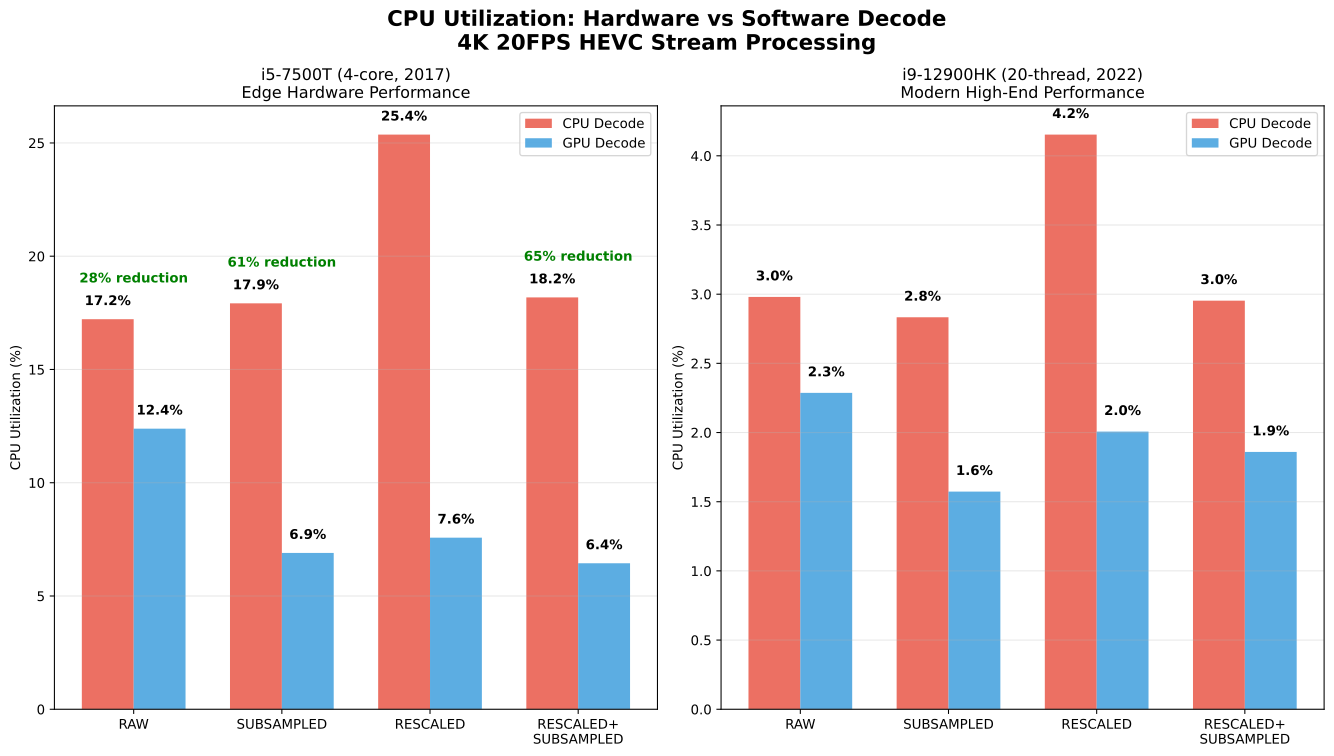
Hardware acceleration delivered:
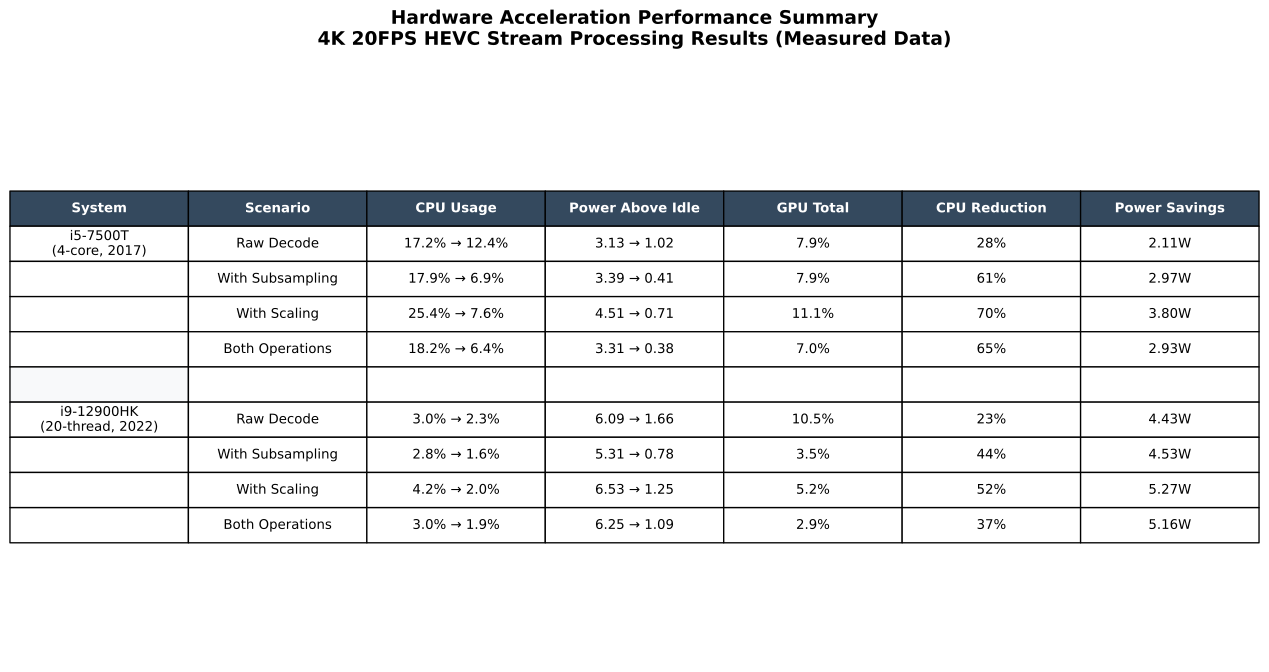
- 28-70% CPU reduction on the resource-constrained i5-7500T
- 23-52% reduction on the high-core-count i9-12900HK
- Largest benefits during preprocessing operations like scaling
Power Consumption
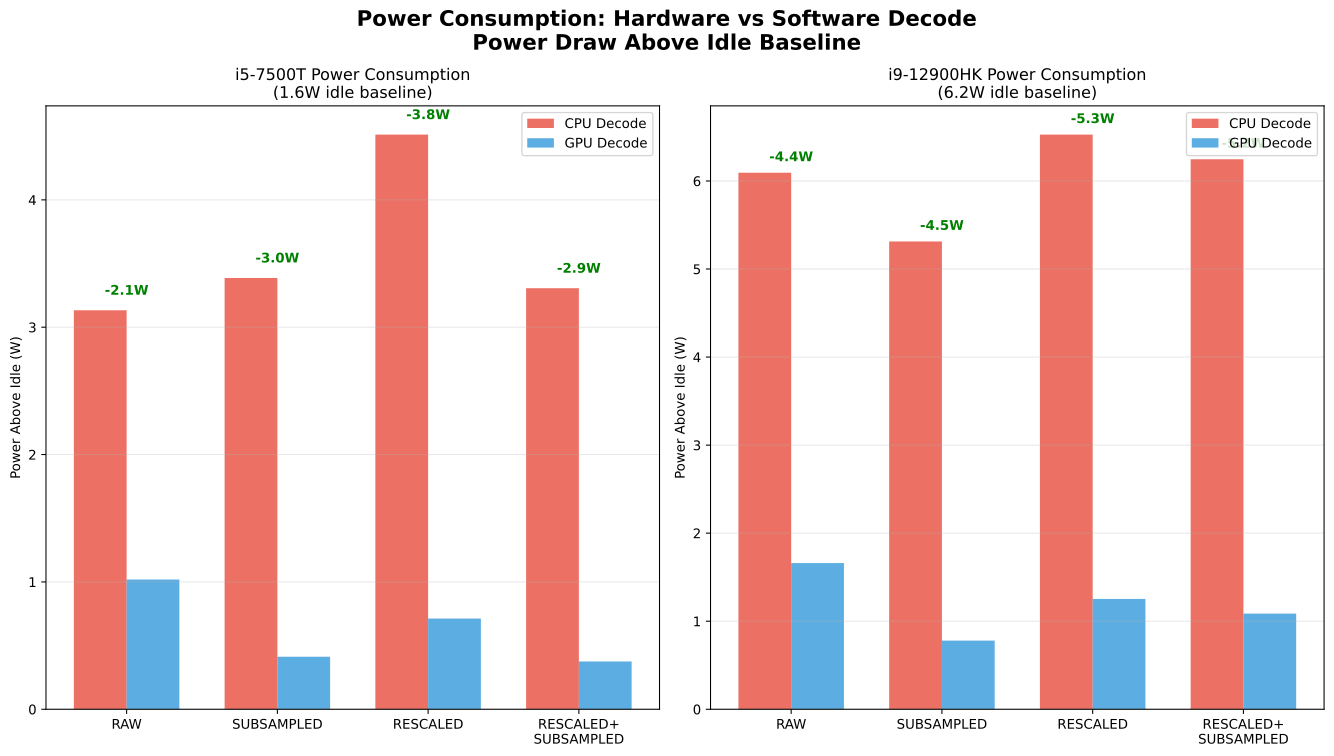
Hardware decode reduced power consumption by:
- 3.8W per stream on the i5 system
- 5.3W per stream on the i9 system
These energy savings scale significantly with camera count in multi-stream deployments.
GPU Utilization
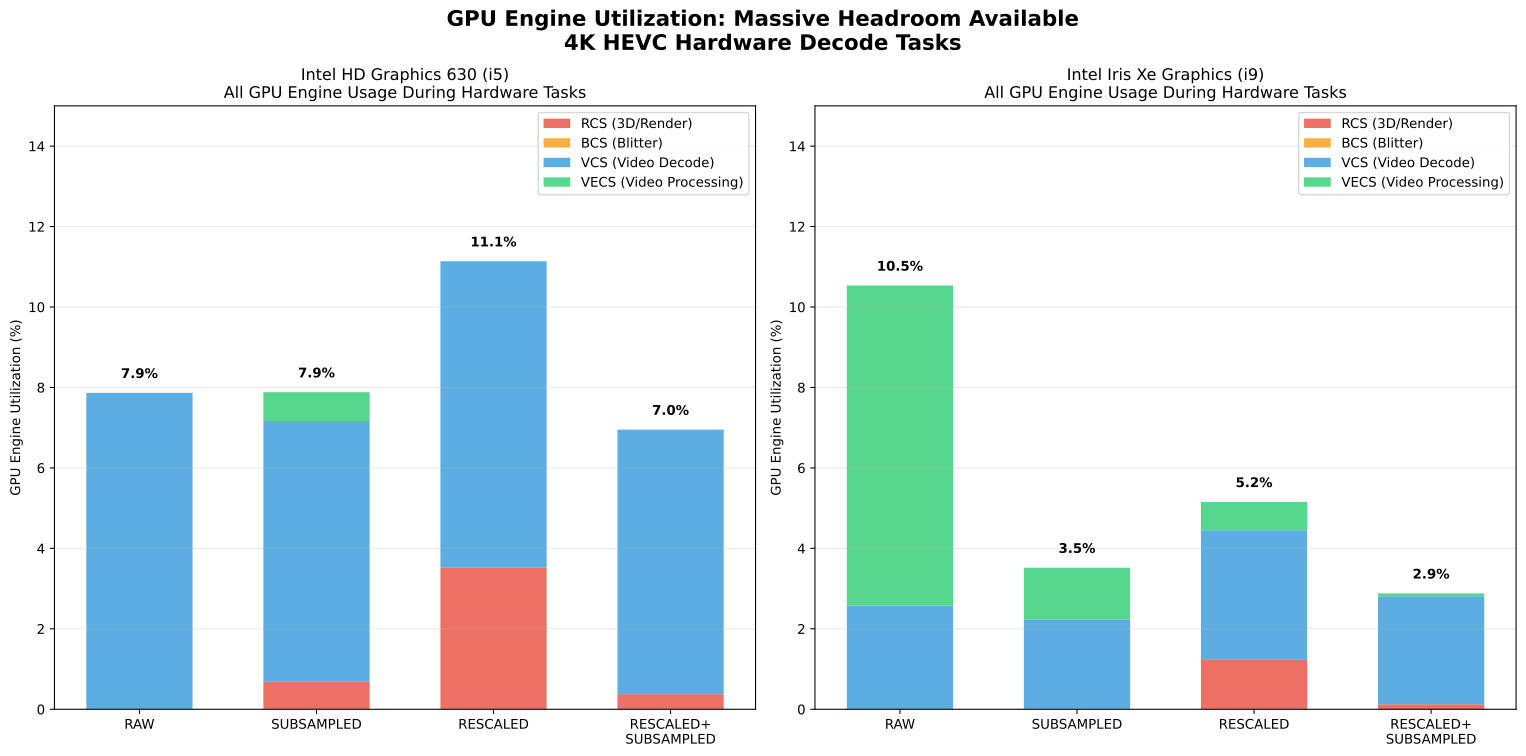
While handling 4K HEVC streams:
- HD Graphics 630 (i5) remained at 7-11% total GPU utilization
- Iris Xe (i9) remained at 3-11% total GPU utilization
This indicates substantial capacity for additional parallel streams in multi-camera vision systems.
Performance Summary
Multi-Stream Scaling
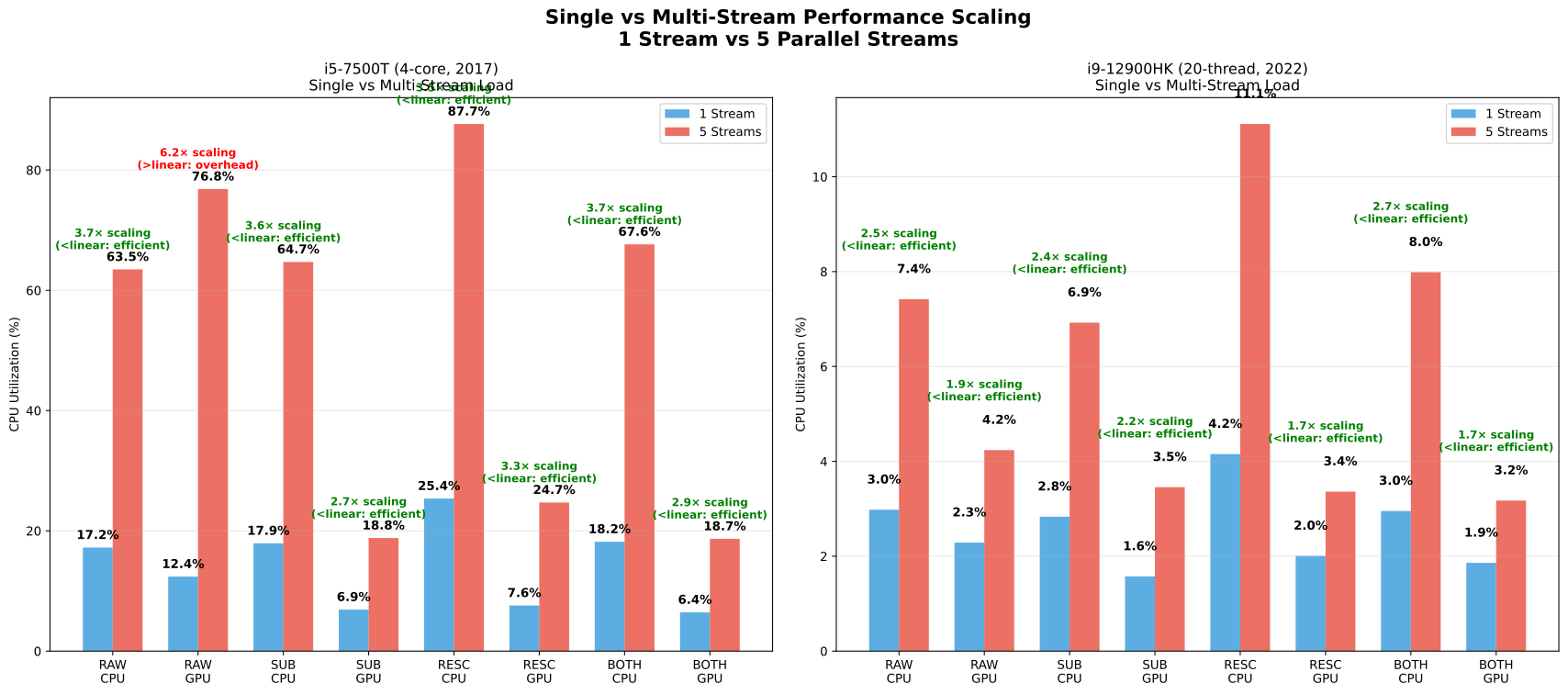
Testing with 5 parallel streams revealed important real-world behaviors:
The resource-constrained i5-7500T showed higher-than-linear scaling for raw decode scenarios due to memory bandwidth limitations when handling multiple large 4K streams. However, preprocessing scenarios (scaling, subsampling) scaled much more efficiently because reduced data volume alleviates memory transfer bottlenecks.
The high-core-count i9-12900HK demonstrated sub-linear scaling, indicating better resource efficiency. Real multi-stream performance depends on system bottlenecks beyond CPU cores—memory bandwidth, cache hierarchy, and I/O subsystems all influence scaling behavior.
When Hardware Acceleration Makes the Biggest Impact
Resource-constrained platforms with 4-8 CPU cores see video decode quickly become the bottleneck. The benchmarks show the 4-core i5 handling 10+ streams via hardware acceleration versus only 2-3 streams with software decode.
Multi-camera deployments benefit proportionally with camera count. Four 4K streams would consume 80% CPU with software decode versus just 16% with hardware decode, freeing 3+ cores for AI processing.
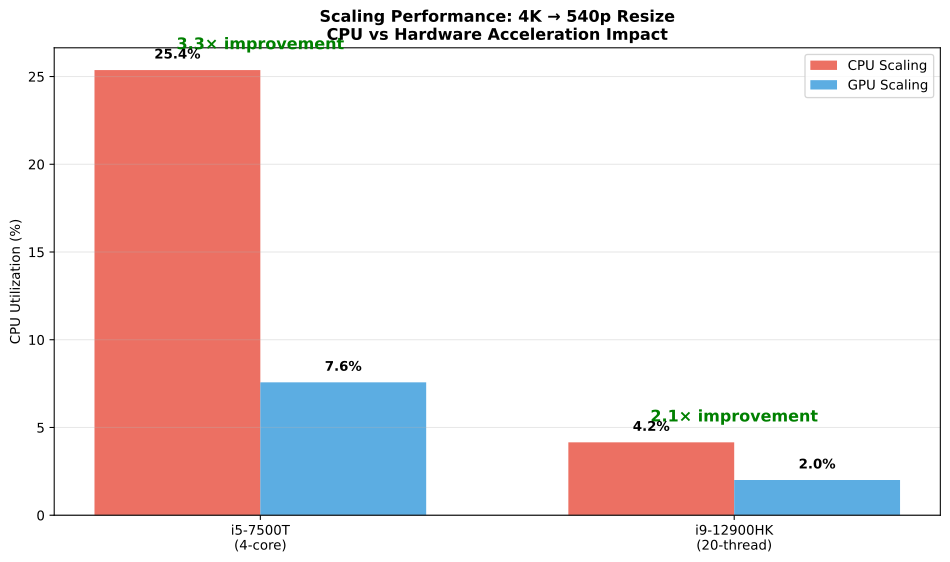
The most dramatic improvements occur in preprocessing-heavy pipelines where computer vision systems resize frames for different model input requirements, showing 3.3× CPU reduction in testing. High-resolution or complex codecs like 4K HEVC streams require substantially more processing, making them ideal candidates for hardware decoders.
Beyond Intel: Universal Hardware Support
Similar acceleration exists across platforms:
NVIDIA: Jetson devices and discrete GPUs include NVDEC hardware decoders. A Jetson Nano struggles with one 4K stream on CPU but handles multiple streams via NVDEC while keeping ARM cores free for AI inference.
ARM: Raspberry Pi 5 and similar devices include hardware video decode blocks. Proper utilization can reduce CPU usage from 100% to a fraction for video streams.
The key principle: check your platform's hardware decode capabilities. The performance patterns demonstrated should apply universally, though implementation details vary by vendor.
Color Space Considerations
An important technical detail: testing used each pipeline's native color space to avoid unnecessary conversion overhead. The CPU decode pipeline naturally outputs YUV420P (planar format), while Intel's QuickSync hardware decoder outputs NV12 (semi-planar format). Rather than force both pipelines to use the same output format, each used its optimal format, ensuring measurement of pure decode and scale performance without artificial bottlenecks from format conversions.
Conclusion
Hardware video acceleration determines whether edge AI systems can scale beyond basic configurations. Modern CPUs benefit significantly from offloading video preprocessing to dedicated hardware.
For Computer Vision Engineers: If your current system processes multiple camera feeds, unused hardware acceleration represents available performance capacity. Simple FFmpeg flag changes (such as -hwaccel qsv plus pipeline parameters) can reduce video processing CPU load by 50-80%, enabling larger models, more cameras, or higher inference throughput on the same hardware.
CPU cores should focus on running algorithms rather than video decoding tasks that specialized silicon handles more efficiently.
Important Considerations
Hardware Limits: Each iGPU has practical decode capacity limits depending on resolution, frame rate, bitrate, and codec complexity. Community reports suggest 15+ concurrent lower-resolution streams are achievable on resource-constrained hardware. The authors' tests successfully ran 5×4K20fps HEVC streams on 2017-era HD Graphics 630. Benchmark your specific workload and target platform.
Codec Compatibility: Ensure your platform supports hardware acceleration for your specific codec. Intel 6th gen+ supports H.264/HEVC; newer generations add VP9/AV1.
Implementation Requirements: Hardware decode requires proper drivers and software support (FFmpeg with QSV/VAAPI, GStreamer with hardware plugins, etc.). The software setup is usually straightforward but platform-specific. Running ffmpeg -hwaccels shows available hardware acceleration methods on your system, and ffmpeg -codecs lists supported codecs.
FFmpeg 8 Performance Note: With the recent official release of FFmpeg 8 and its dramatically rewritten libswscale (showing 2-40× performance improvements for scaling operations), retesting these benchmarks would provide updated performance data. The new swscale implementation may impact CPU-based scaling results and reduce the performance gap between software and hardware acceleration for resize-heavy pipelines.